Coding agents in the cloud and showing their work
I’ve been an avid Amp user for some time now and recently started working with Claude Code in the browser. I wanted to write down why I think they’re such an interesting tool for developers. The models are the same ones I use in the terminal. What changes is everything around them: the agent runs on its own machine, it can start the app I’m working on, and it can show me that what it built actually works.
To make it concrete, all the screenshots and videos in this post (and the bugs!) come from one session where I asked it to improve a small thing in my gym tracking app. I ran that session with Claude Code on the web, using the browser and the mobile app in combination: I could start the task from one, then check on its progress, look at the screenshots and videos and steer it from the other. The results highlighted here come from that setup.
Background
It’s worth looking back at how fast the way we work with LLMs has changed. Not long ago, the state of the art was Cursor and GitHub Copilot: plugins that lived on the side of the IDE, where you’d ask for a snippet, an explanation or an autocomplete and then paste or accept the result yourself.
Then those same plugins got their agentic mode. I still remember the first time I asked Cursor to update the layout of a button in the UI and it actually did it!! It opened the right files, made the change and I could see it on the screen. It felt like magic.
The next step was agents in the terminal. Claude Code, Codex and Copilot CLI arrived, and with them the first real glimpse of how fast these models can write code, faster than we could ever review it.
Now the agents are moving off our machines and into the cloud, which is what the rest of this post is about. Thorsten Ball from the Amp team has been saying that the local development environment is dead. I honestly don’t know what the future will look like, and he may well be right. I still use my setup with tmux, Neovim and everything else every day, so I’m not quite there yet. But I get where it comes from: if you can spawn several agents, each working in its own isolated environment, why would we keep dealing with port conflicts, or with the fear of an agent doing something it isn’t supposed to do on our own machines?
Amp takes this even further. Its agents run in their own cloud machines (which Amp calls orbs), and they can generate portals: DNS endpoints that route straight to the app the agent is working on. You open the link in your own browser and use the app yourself. They load really fast, and it feels almost like a local dev experience. Wild stuff! You can also add init scripts to your orbs that install dependencies and prepare the environment, so every new agent starts from a machine that’s ready to run your app.
I know I’m talking a lot about Amp here, but that’s because I really like what they’ve built. I’m not affiliated with them in any way, just a fan :)
It runs on its own machine
When you give it a task, the agent gets a VM with your repository cloned into it. It installs dependencies, sets up the database, builds the project, starts the backend and the front-end and talks to both of them. I can close my laptop and the task keeps going, and I can have three tasks running at the same time without them fighting over ports or node_modules.
It also takes care of the thing that makes me a bit nervous with agents running locally: them downloading and installing stuff onto my machine. Inside a throwaway VM that doesn’t matter, and if something goes wrong I just delete the session.
Proof that it works
If you’ve used a coding agent you’ve probably seen this one: it says “Done! I’ve implemented the feature”, you run the app locally and nothing happens.
These agents running on VMs can back up what they say with some evidence:
- they run the test suite and tell you which tests they added or changed;
- they start the real application and call the real endpoints;
- they open a browser, click through the flow and take screenshots and videos of it.
The browser part is the one that surprised me the most. The agent uses a real browser against the app it just started, so it can notice that a modal never opens or that a table is showing NaN, which a unit test would happily miss. By the time I open the diff I’ve already seen the feature working.
That also changes how I review. I used to read the diff and try to picture how the app would behave. Now I start from a video of the behaviour and read the code to check it got there in a reasonable way.
An example: my gym stats app
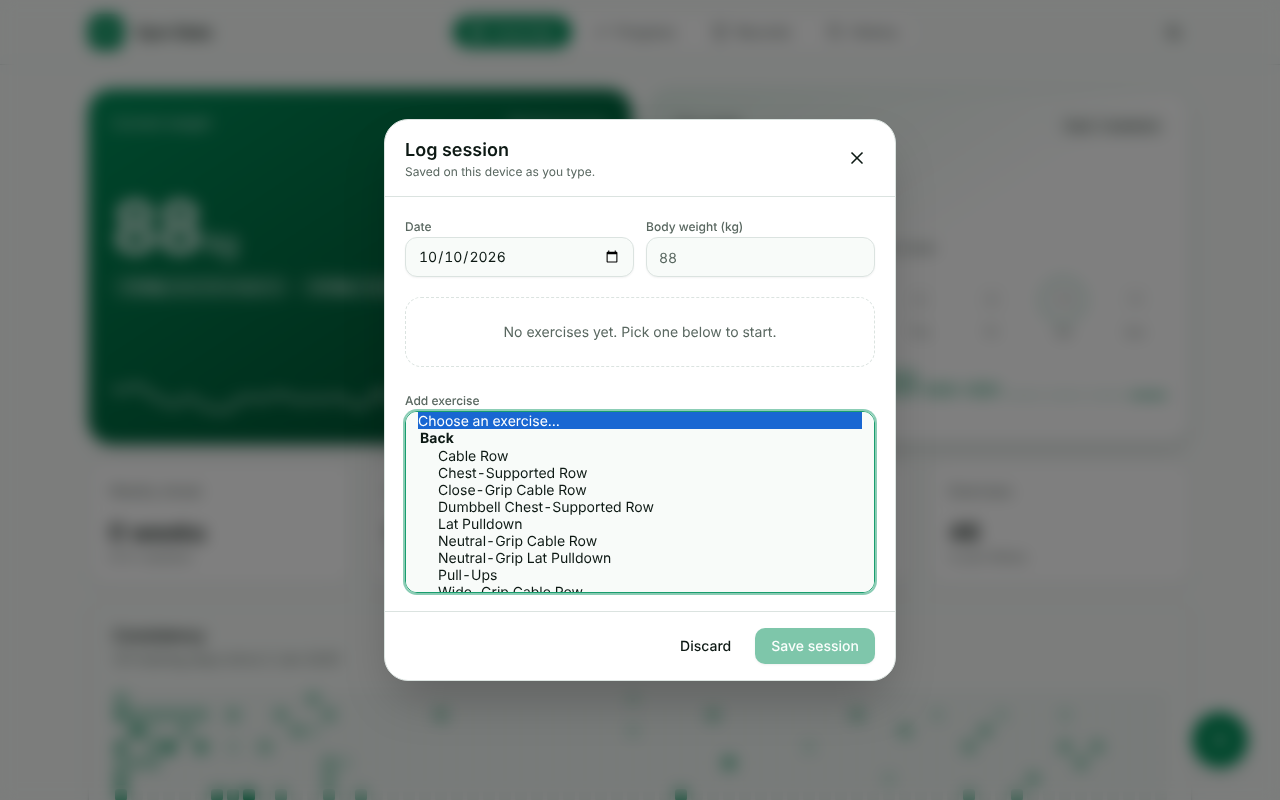
I track my workouts in a small Rails app (Hotwire, Phlex, Tailwind and Postgres). On the overview page there’s a button to log a session, which opens a modal where you add the exercises you did. The “Add exercise” field was a plain <select> with around 46 exercises grouped by muscle, so finding one meant scrolling a long list on my phone in between sets. The exercise progression page already had a searchable dropdown, so I wanted the same thing here.
My prompt was more or less: “run the app locally, go to the add exercise button, reproduce the issue and save screenshots and a video. Then replace the dropdown with a searchable one like the progression page, and give me a screenshot and a video again.”
Getting the app running
First it had to get the app running in its VM. It started the Postgres server (installed, but not running), created the database, imported my real workout data with one of the app’s rake tasks, built the Tailwind CSS and started Rails. The .ruby-version file asked for a Ruby version that wasn’t installed, so it tried the one that was available and the app booted fine. I didn’t have to do anything.
Reproducing the problem
Then it opened the app in a headless Chromium with Playwright, clicked the button and recorded it:
The fix, and the bugs it found in its own work
The change itself was small, because it reused the combobox component from the progression page. It swapped the <select> for the combobox in the modal and adapted the Stimulus controller that turns a selected exercise into a card.
Of course I could have done this myself, and it would have been quite fast. The point of the exercise is that I can start a task like this, move on to something else, and come back to a branch with screenshots and a video waiting for me. Doing that with several agents working on different things at the same time is where I really get a feeling of power from these tools.
The interesting part came after that. Before recording anything, it wrote a quick browser script that opened the picker, typed inc, pressed the down arrow and Enter, and printed what ended up on the screen. Two problems showed up:
- Typing did nothing. Focus stayed on the button, so the text never reached the search box. It checked the progression page and saw the same thing happens there, since the component doesn’t focus its search input. It fixed this just for the logging modal, where you want to start typing right away, and left the progression page as it was.
- An exercise called “inc” appeared in the session. The search box fires its own
changeevent, which bubbled up to the handler that adds exercises, so the search term was added as if it were an exercise. I’m pretty sure I would have missed this one in a code review and only found it at the gym.
With both fixed, this is the new flow:
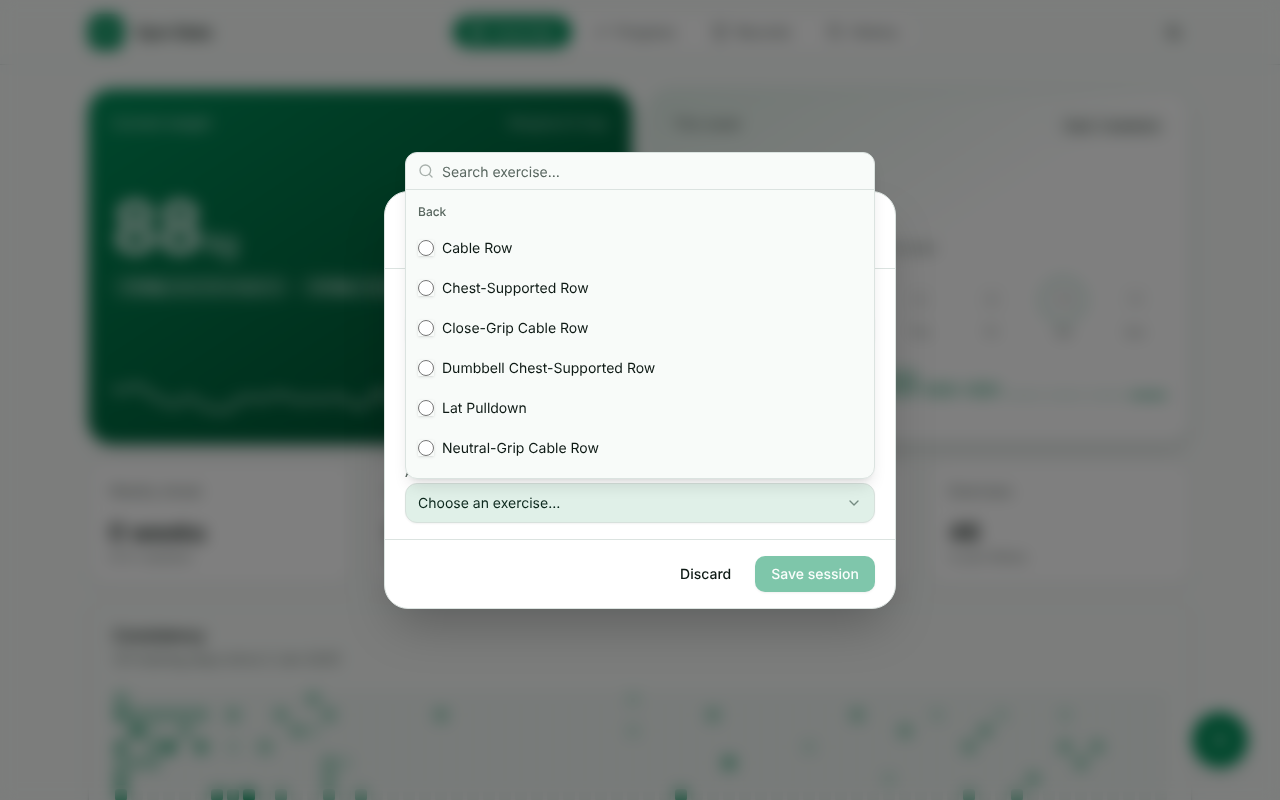
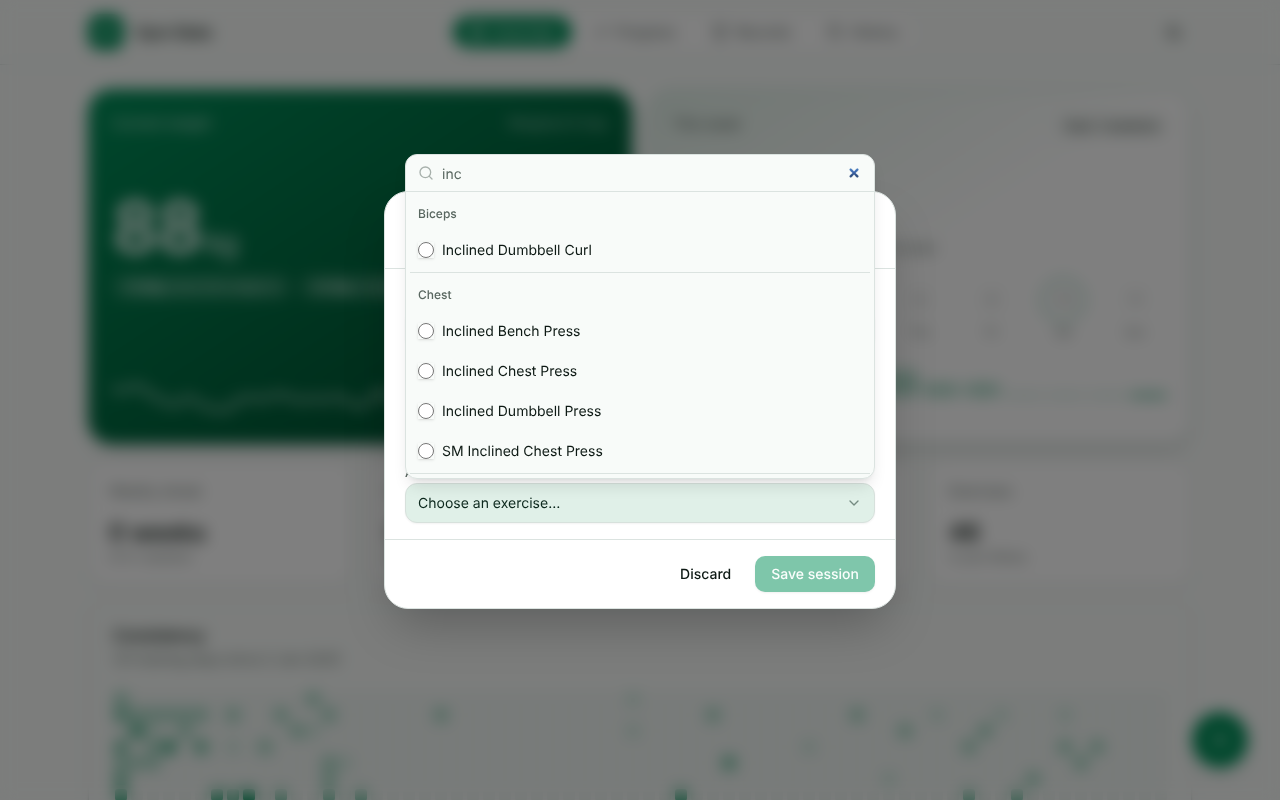
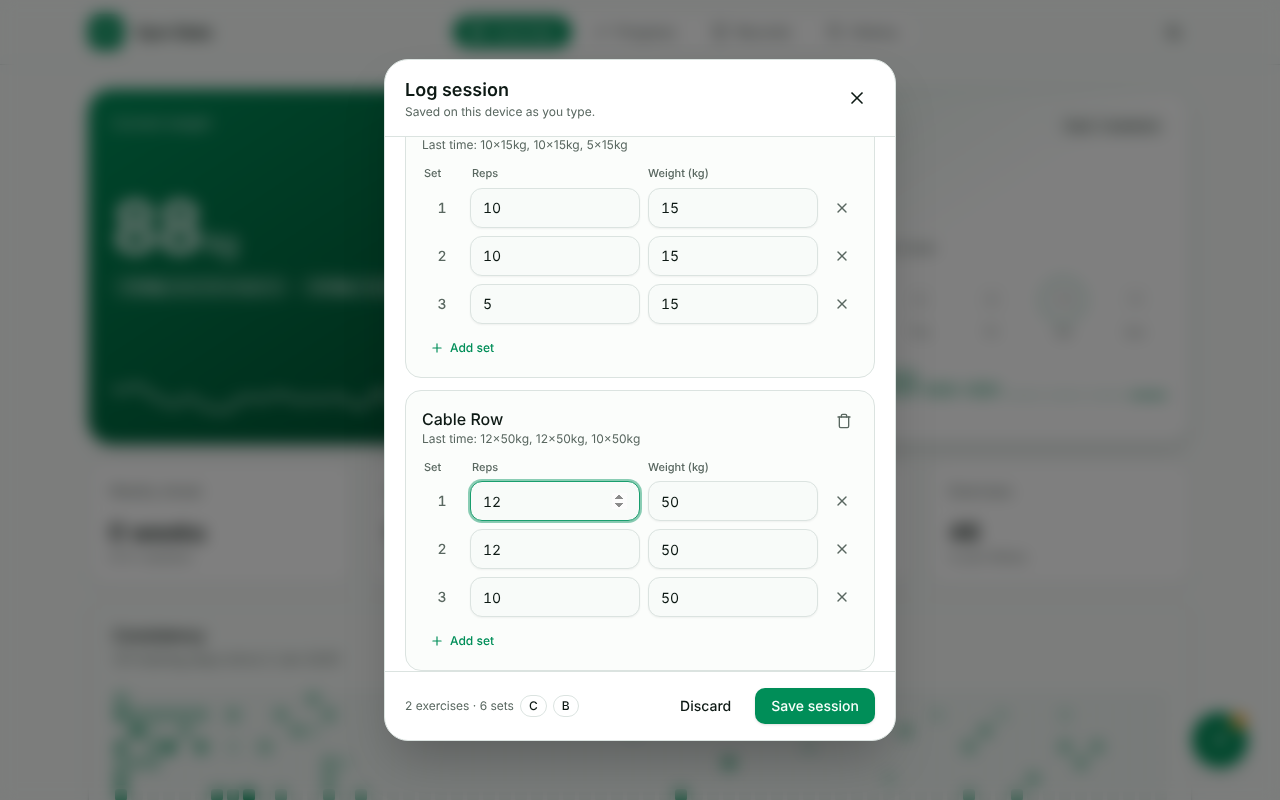
It also updated the system test that still used select "Bench", from: "Add exercise" so it uses the new combobox, and added a test for the filtering and the “No exercises found.” message. Then it ran the linter and the tests, committed and pushed a branch.
Where it still falls short
The session also showed some limits:
- Some things can’t be checked inside the sandbox. The app’s system tests use Selenium, and the ChromeDriver in the VM didn’t match its Chromium version, with no network access to download the right one, so those tests didn’t run. The agent told me that clearly and pointed out that its Playwright script went through the same flow.
- The proof only covers the scenarios the agent decides to test. It’s happy to check the happy path and skip the edge case you actually care about, so you still have to ask for the important ones.
- The videos were recorded in a desktop-sized window and I mostly use the app on my phone. I still read the code and try it myself before merging.
Considerations: getting further away from the code
With these tools we really do get more detached from the code. That’s what lets us work on more problems at the same time than ever before. I can have one agent fixing a bug, another one prototyping a feature and a third looking into a slow query, and jump between them. The other side of it is that we’re no longer the ones writing the code.
We’re still responsible for it, though. Developers own the code they deploy to production, whoever (or whatever) wrote it. Reviewing the code isn’t enough on its own, so I need other things in place to catch problems:
- Unit, integration and end-to-end tests are more important than ever. They’re what lets you trust a change you didn’t write yourself, and they’re also what the agent relies on to prove its work. The better the test suite, the better the proof. In the gym app, the existing system test is what described how the picker had to keep behaving.
- Both the developers and the agents need to be able to debug the app quickly: boot it, reproduce a problem, read the logs. If it takes a person a whole day to get the project running locally, an agent will have a hard time too.
- Ephemeral environments per feature make it cheap to try an idea and throw it away. The agent’s VM is already a small version of this, and preview environments per branch bring the same idea to the whole team.
- Feature flags and trunk-based development help when changes arrive faster. Changes should be small, merged often and easy to switch off. Flags let you ship something that isn’t fully proven yet without exposing it to everyone, and trunk-based development avoids long-lived branches that are painful to merge for anyone, human or agent.
We’ve known for a long time that these are good practices. Working with agents makes them a lot more important, because the faster code gets written, the more the process around it matters.
Reviewing the code is still part of the job. I review every line the agents write, and I run the git commands myself when I separate the changes into commits, so each one is self-contained, short and descriptive. That’s how I stay away from the 50k-line pull requests we’ve all seen online. I treat the agent’s code as if it were mine: every line should be there for a reason. Agents tend to write too much (comments, I’m looking at you), and when you don’t know there’s a simpler way to do something, it’s easy to accept a very verbose implementation.
Closing thoughts
For me the hardest part of letting AI write code was always trusting the result. Having the agent run the app, use it in a browser and send me screenshots and videos makes that much easier. I now reach for these tools first whenever I have a task I can describe clearly.